Workflows & Automation
How to Use GoHighLevel's Trigger Narration Feature in Workflows
By Marnix Geerkens. Published 2026-02-10. Updated 2026-06-02.
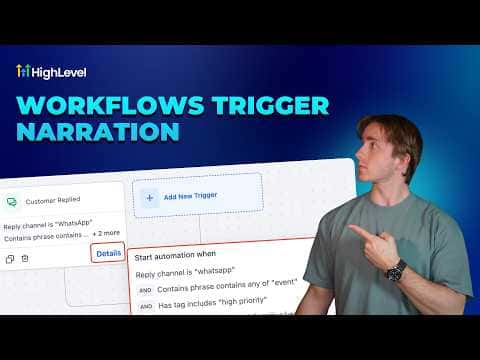
Trigger narration is a small display built into the GoHighLevel workflow canvas that shows you a plain-language summary of what is firing a workflow and why. Instead of clicking into the trigger and reading through filter lists, you see the key conditions right on the trigger card. A Details button expands a slightly fuller view when you need more context.
Watch it, then build it
Get the full platform free for 30 days
That walkthrough runs on GoHighLevel. Start it free through RocketLauncher and you get 30 days instead of the usual 14, the whole platform unlocked, plus our setup help and a community of thousands of builders in 47+ countries.
30 days, not 14Full platform, nothing held backFree community and setup help
We earn a referral commission if you keep GoHighLevel after the trial. It never changes your price.
Summary. GoHighLevel's trigger narration feature adds a readable summary directly onto each trigger card inside the workflow builder. It shows the trigger type and its active filters at a glance, which is useful when reviewing complex automations or onboarding team members who need to understand how a workflow fires without digging into configuration screens. The Details button reveals an expanded version of the same information.
Related tutorials
Watch it, then build it
Get the full platform free for 30 days
30 days, not 14Full platform, nothing held backFree community and setup help
Frequently asked questions
Where does the trigger narration appear?
It appears directly on the trigger card inside any open workflow in the builder.
Does trigger narration replace clicking into the trigger to edit it?
No, it is read-only. You still click into the trigger to change filters.
Is this useful for team members who did not build the workflow?
Yes, it lets any team member read what fires the workflow without touching the settings.