
Free MCP server
RocketLauncher MCP: The Free Website Scanner for Any AI
By Marnix Geerkens. Published 2026-08-11. Updated 2026-08-12.
In short
RocketLauncher MCP is a free, open MCP server at https://rocketlauncher.ai/mcp. Point Claude, Cursor, or any MCP client at that one URL and your AI can scan any website for security, SSL, DNS, SEO, tech stack, and fixable lead gaps, right inside a chat. There is no API key, no token, and no signup.
- One URL, no key: add https://rocketlauncher.ai/mcp and you are connected.
- Free and open. Scan any public website, no account needed.
- Four tools: scan_website, website_lead_gaps, detect_tech_stack, full_audit.
Connect it in about a minute
Add one URL in Claude and you are done. Four steps, no code:
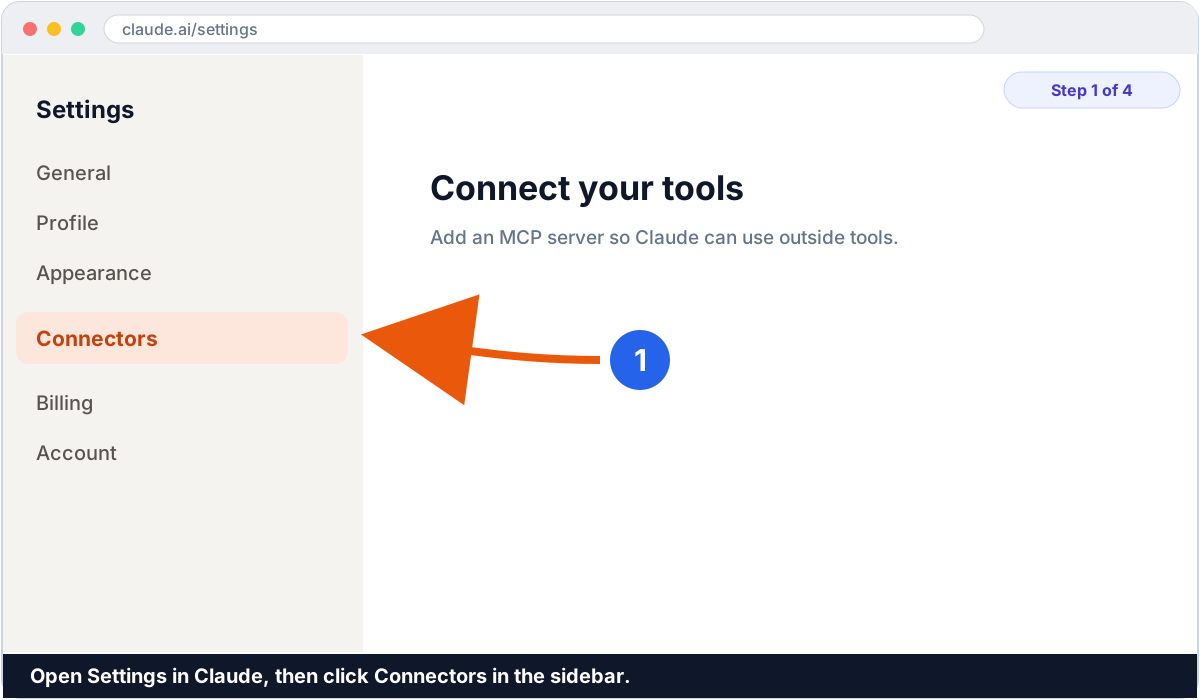
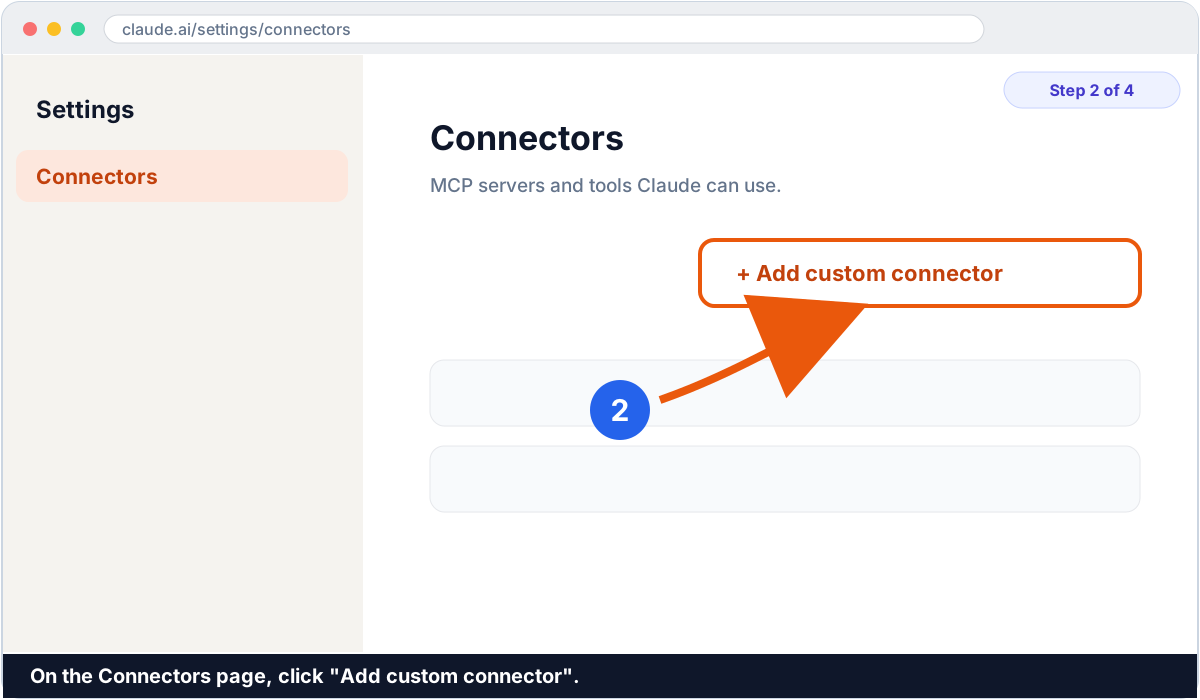
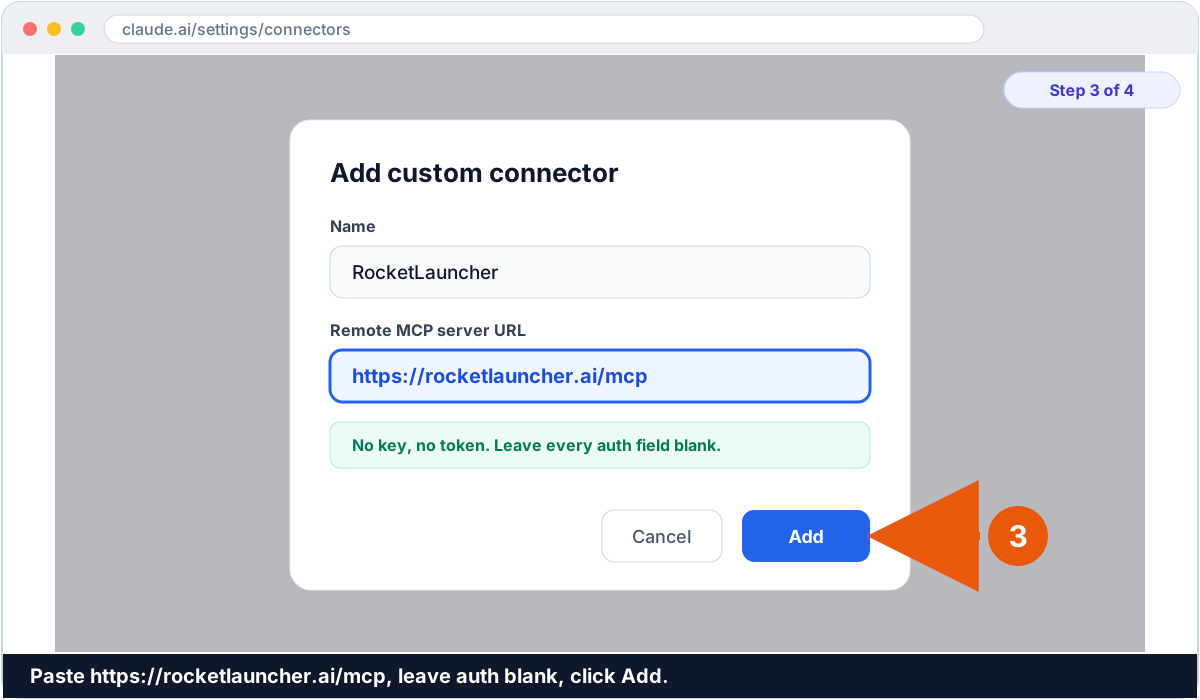
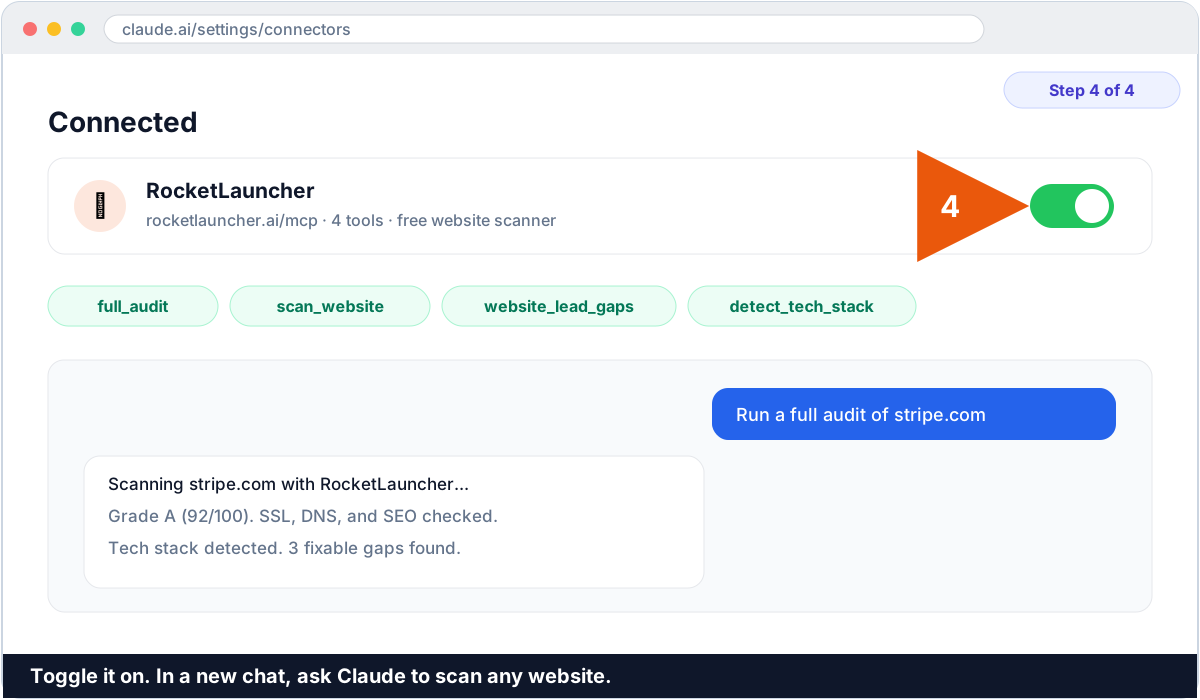
On Cursor or Claude Code, use the config block or one-line command further down instead. The URL is always the same: https://rocketlauncher.ai/mcp.
What is the RocketLauncher MCP server?
RocketLauncher MCP is a free website scanner your AI assistant can call using the Model Context Protocol (MCP), the open standard for letting an assistant use an outside tool through defined actions.
Once it is connected, you can ask your assistant to scan any public website and it returns a real report: security headers, SSL, DNS and email records, SEO, the detected technology stack, and a list of fixable gaps with a ready-to-send pitch line for each. The server is named RocketScanner and it powers the same free scanner behind the RocketLauncher website tools.
It is open and free. There is no API key, no token, and no location ID. Any MCP-capable client connects with just the URL. It only reads public websites, so there is nothing in your own accounts for it to touch.
What can it do? The four tools
The server exposes four tools. Your assistant picks the right one automatically based on what you ask.
Every tool is read-only and returns the analysis plus a link to the free RocketLauncher University community.
See it in action: detect a tech stack
Ask your assistant "detect the tech stack behind example.com" and in a few seconds it hands back what that site runs, and what it is missing:
example.com
  CMS:        WordPress + Elementor
  Analytics:  Google Analytics 4, Meta Pixel
  CDN:        Cloudflare
  Email auth: no SPF, no DMARC   (emails likely land in spam)
  Booking:    none found
  Reviews:    no review system found
  Speed:      slow on mobile (large images)
That last block is the good part. You now know exactly what the business uses and, more useful, what it is missing. Missing email authentication, no online booking, no review system, a slow site: every one of those is a fixable problem you can sell.
Turn a free scan into a paying client
Here is where it gets fun. The scan costs nothing, so you can point it at any business and instantly see what is wrong with their online setup. That is a client-finding machine.
1. Find businesses on Google Maps
Open Google Maps and search something like "dentist in your city" or "roofer near me". That is a ready-made list of local businesses, each with a website and a phone number.
2. Scan each website
Run full_audit or website_lead_gaps on their site. The scanner hands back a ranked list of what is broken or missing: no email authentication, a slow site, no online booking, no review system, no follow-up on missed calls. Each gap comes with a plain pitch line.
3. Reach out with a real reason
You are not cold pitching into the dark. You have their actual report. Send it by email, SMS, phone, or WhatsApp, all from one place in GoHighLevel, and start the conversation with a problem they can see for themselves.
4. Build the fix and get paid
Then build it inside GoHighLevel: a fast site or funnel, missed-call text back, automatic review requests, online booking, and a follow-up workflow. Charge a setup fee plus a monthly retainer. With SaaS Mode you can even rebill the whole platform under your own brand.
What a time to be alive
Stop and think about what just happened. An AI, in a normal chat, scanned a real business, found exactly what is broken, wrote you a pitch, and handed you the tools to fix it and charge for it. A few years ago that was a team of people and a week of work.
And the scanner that finds every one of these opportunities is completely free. No API key, no usage bill, no limit. You bring the hustle, the RocketLauncher MCP brings the analysis, and GoHighLevel builds and bills the fix. What a time to be alive.
Connect Cursor, Claude Code, or another client
Not using the Claude web app? The URL is the same everywhere, over Streamable HTTP, no key:
https://rocketlauncher.ai/mcpCursor or another JSON-config client
Add one block to your MCP config file and restart the app.
{
  "mcpServers": {
    "rocketlauncher": {
      "url": "https://rocketlauncher.ai/mcp"
    }
  }
}
Claude Code (one command)
Run this in your terminal, then type /mcp to confirm rocketlauncher shows up in the connected tools list.
claude mcp add --transport http rocketlauncher https://rocketlauncher.ai/mcpTry these prompts once connected
A quick way to confirm it works, and a taste of what it is good at:
- "Run a full audit of stripe.com."
- "Scan my website and tell me what is failing on security and SEO."
- "Find dentists near me on Google Maps, then check what their websites are missing."
- "What is my competitor missing? Find the lead gaps on their site."
- "Detect the tech stack behind shopify.com."
Test it from the command line
You do not need an AI client to check the server is up. This lists its tools straight from a terminal:
curl -s -X POST https://rocketlauncher.ai/mcp \
  -H "Content-Type: application/json" \
  -d '{"jsonrpc":"2.0","id":1,"method":"tools/list"}'
A healthy server returns a JSON list with the four tool names. A plain GET to the same URL returns a short server-info JSON block.
Why is it free?
RocketLauncher is a live GoHighLevel showcase and a free community. The scanner MCP is part of that: the more assistants can check a website and hand back a clear, honest report, the more people find their way to the free community to fix what the scan turns up.
There is no paywall, no key, and no usage bill on this server, ever. If you want to go further, join RocketLauncher University, the free community, where you also claim a 30-day GoHighLevel free trial instead of the usual 14 and get the tools to build every fix the scanner finds.
RocketLauncher University on Skool. Free to join, thousands of builders.
Frequently asked questions
What is the RocketLauncher MCP endpoint URL?
The endpoint is https://rocketlauncher.ai/mcp. It speaks the Model Context Protocol over Streamable HTTP, so any MCP client connects with just that URL and no key.
Do I need an API key or login to use it?
No. The RocketLauncher MCP server is free and open. There is no API key, no token, and no signup. You add the URL and start scanning. Leave any authentication field blank.
What can it actually do?
It scans public websites. The four tools are full_audit (everything in one call), scan_website (graded security, SSL, DNS, and SEO report), website_lead_gaps (fixable issues with a pitch line for each), and detect_tech_stack (the technologies a site runs).
Which AI tools can connect to it?
Any client that supports MCP over Streamable HTTP. That includes Claude (web, desktop, and Claude Code), Cursor, and other MCP-capable assistants. The URL is the same for all of them.
Can I use this to find clients for my agency?
Yes, that is one of the best uses. Find local businesses on Google Maps, run their website through full_audit or website_lead_gaps, and you get a ranked list of what is broken or missing plus a pitch line for each. Reach out with the real report by email, SMS, phone, or WhatsApp from GoHighLevel, then build the fix and charge for it. The scan itself is free.
Can it read or change my own accounts?
No. It only reads public websites you ask it to scan. It has no access to any private account, and it cannot write or delete anything.
How is this different from GoHighLevel's own MCP server?
GoHighLevel's official MCP server connects an assistant to your live CRM to read and write your data, and it needs a Private Integration Token. The RocketLauncher MCP server is a free, keyless website scanner. Different job, no token.