RocketLauncher AI

Reporting & Dashboards

GoHighLevel Dashboard Overview: What Each Section Means

By Marnix Geerkens. Published 2019-02-26. Updated 2026-06-02.

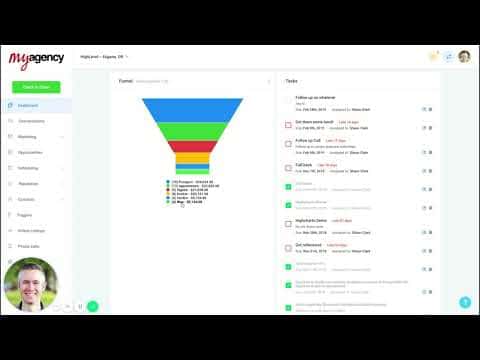
The GoHighLevel dashboard is the first screen clients see when they log in. It pulls together opportunities, pipeline value, conversion rate, appointment data, lead source breakdowns, Google Business stats, and review performance into one view. Understanding each section helps you explain the numbers to clients and spot where leads are dropping out of the funnel.

Watch it, then build it

Get the full platform free for 30 days

That walkthrough runs on GoHighLevel. Start it free through RocketLauncher and you get 30 days instead of the usual 14, the whole platform unlocked, plus our setup help and a community of thousands of builders in 47+ countries.

30 days, not 14Full platform, nothing held backFree community and setup help

We earn a referral commission if you keep GoHighLevel after the trial. It never changes your price.

Summary. This overview explains each section of the default GoHighLevel dashboard, from the opportunities summary and pipeline value counter to the sales funnel visualization, task list, appointment history, and integrations for Google Ads, Google Business Profile, reviews, and listings. It also clarifies the funnel's cumulative counting logic, which is easy to misread without context.


Related tutorials

How to Embed External Content on Your Dashboards
How to Embed External Content on Your Dashboards2:02 · Reporting & Dashboards
How to Create Custom QR Codes in HighLevel
How to Create Custom QR Codes in HighLevel5:57 · Reporting & Dashboards
How to Customize Dashboard Themes in HighLevel
How to Customize Dashboard Themes in HighLevel1:47 · Reporting & Dashboards
How To Leverage HighLevel's SEO Heatmap for Better Business Ranking Reports
How To Leverage HighLevel's SEO Heatmap for Better Business Ranking Reports4:05 · Reporting & Dashboards
How to Master Dashboard Widgets for Improved Business Insights
How to Master Dashboard Widgets for Improved Business Insights10:09 · Reporting & Dashboards
How To Create Report and Dashboard Templates in HighLevel
How To Create Report and Dashboard Templates in HighLevel5:41 · Reporting & Dashboards

Watch it, then build it

Get the full platform free for 30 days

30 days, not 14Full platform, nothing held backFree community and setup help

Frequently asked questions

Why does the funnel section show more contacts than the individual stage counts suggest?

The funnel is cumulative. Everyone in a later stage is also counted in all earlier stages, showing where drop-off happens.

What does the lead source report show?

It shows how many leads came from each source, what dollar value they represent, and how they are converting.

Does the Google Business Profile section update automatically?

Yes, once the integration is connected it pulls search impressions, actions, and interaction data automatically.

Back to all Reporting & Dashboards tutorials