RocketLauncher AI

Getting Started & General

How to Track Product Margins in GoHighLevel for Ecommerce

By Marnix Geerkens. Published 2026-05-27. Updated 2026-06-02.

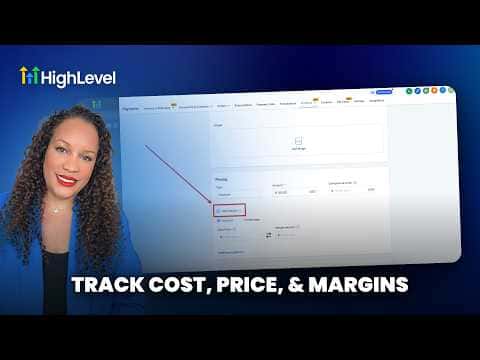
GoHighLevel's ecommerce product settings include a cost-of-goods field that lets you record what each item costs you to produce or source. Once filled in, the platform calculates and displays the margin for each product so you can see at a glance which items are profitable and which are not, without leaving your GoHighLevel account.

Watch it, then build it

Get the full platform free for 30 days

That walkthrough runs on GoHighLevel. Start it free through RocketLauncher and you get 30 days instead of the usual 14, the whole platform unlocked, plus our setup help and a community of thousands of builders in 47+ countries.

30 days, not 14Full platform, nothing held backFree community and setup help

We earn a referral commission if you keep GoHighLevel after the trial. It never changes your price.

Summary. GoHighLevel lets you attach a cost-of-goods value to each ecommerce product alongside its selling price. The platform then surfaces the margin automatically, giving store owners a quick view of per-product profitability. This removes the need for a separate spreadsheet and keeps financial data tied directly to the products you are selling.
Related tutorials

How To Optimize Product Media Layouts in HighLevel
How To Optimize Product Media Layouts in HighLevel2:33 · Getting Started & General
How To Track SLA Performance in HighLevel's CRM
How To Track SLA Performance in HighLevel's CRM3:28 · Getting Started & General
How To Filter Media by File Type in HighLevel
How To Filter Media by File Type in HighLevel1:22 · Getting Started & General
How To Add Taxes to Rentals in HighLevel Easily
How To Add Taxes to Rentals in HighLevel Easily2:09 · Getting Started & General
Did You Know You Can Host Paid Communities Directly in HighLevel?
Did You Know You Can Host Paid Communities Directly in HighLevel?1:57 · Getting Started & General
How To Set Up ACH Transfers with NMI in HighLevel
How To Set Up ACH Transfers with NMI in HighLevel2:37 · Getting Started & General

Watch it, then build it

Get the full platform free for 30 days

30 days, not 14Full platform, nothing held backFree community and setup help

Frequently asked questions

Where do I enter the cost of goods for a product in GoHighLevel?

Open Payments, select Products, pick the product, and enter the cost field.

Does GoHighLevel calculate margin automatically once I add cost data?

Yes. The platform computes margin from the price and cost you enter.

Back to all Getting Started & General tutorials