RocketLauncher AI

CRM, Contacts & Lead Gen

How to Use the GoHighLevel Prospecting Tool

By Marnix Geerkens. Published 2023-10-06. Updated 2026-06-02.

The GoHighLevel prospecting tool lets agency owners search for local businesses, review their online presence at a glance, and generate a personalized marketing audit report to share with each prospect. Search by business type and city, flag weak spots like low Google reviews or an unclaimed profile, and convert any prospect directly into a sub-account when they sign up.

Watch it, then build it

Get the full platform free for 30 days

That walkthrough runs on GoHighLevel. Start it free through RocketLauncher and you get 30 days instead of the usual 14, the whole platform unlocked, plus our setup help and a community of thousands of builders in 47+ countries.

30 days, not 14Full platform, nothing held backFree community and setup help

We earn a referral commission if you keep GoHighLevel after the trial. It never changes your price.

Summary. GoHighLevel's prospecting tool works as a business research and outreach starting point for agency owners. You search for businesses in a specific area, and the tool surfaces Google ratings, whether a Google Business Profile is claimed, and whether the business runs WordPress. A one-click marketing audit report adds detail on listing accuracy, review performance, and online reputation, and you can share it as a PDF or a live link. When a prospect converts, you can turn their record into a sub-account without re-entering data.

Steps

  1. Open the Prospecting Tool from Your Agency Dashboard

    From the agency-level dashboard, select Prospecting in the left menu. Click Add a Prospect to begin a new search.

  2. Enter a Business Type and Location

    Type your search criteria into the search bar, for example 'plumbers in Bozeman Montana'. The tool returns a list of matching businesses.

  3. Review the Quick Data Points

    Each result shows the Google rating, whether the Google Business Profile is claimed, and whether the site uses WordPress. Use these signals to prioritize who to approach.

  4. Click a Business to See Details and Save Contact Info

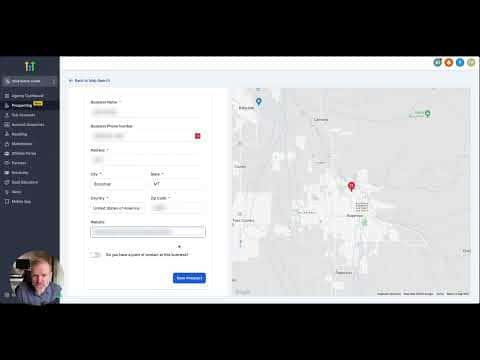
    Open the business record to see its website URL. Toggle the contact details section and enter the owner's information if you have it, then click Save Prospect.

  5. Generate and Share the Marketing Audit Report

    Let GoHighLevel generate the report. Review sections covering listing accuracy, review counts, and text enablement. Download it as a PDF or copy the share link to send directly to the prospect.

  6. Convert to a Sub-Account When They Sign Up

    From the prospect overview page, click the convert button to create a sub-account pre-filled with the business details you already entered.

Related tutorials

How To Generate Leads From Local Chamber & BNI Meetups!
How To Generate Leads From Local Chamber & BNI Meetups!2:15 · CRM, Contacts & Lead Gen
How To Create Custom Values
How To Create Custom Values3:16 · CRM, Contacts & Lead Gen
How to Use Contact Engagement / Lead Scoring in HighLevel
How to Use Contact Engagement / Lead Scoring in HighLevel4:11 · CRM, Contacts & Lead Gen
How to Create Contactless Tasks for your Team Members
How to Create Contactless Tasks for your Team Members2:49 · CRM, Contacts & Lead Gen
Add tags + add task zap
Add tags + add task zap1:28 · CRM, Contacts & Lead Gen
How To Copy Contacts From One Sub-Account To Another
How To Copy Contacts From One Sub-Account To Another3:05 · CRM, Contacts & Lead Gen

Watch it, then build it

Get the full platform free for 30 days

30 days, not 14Full platform, nothing held backFree community and setup help

Frequently asked questions

What does the marketing audit report show?

Listing accuracy, review count, reputation data, and whether the business has text messaging enabled.

Can I share the report without downloading it?

Yes, GoHighLevel generates a shareable link you can email directly to the prospect.

What does a claimed Google Business Profile mean for my pitch?

It means they may not have set up Google Business Chat, which GoHighLevel can activate as an easy first win.

Back to all CRM, Contacts & Lead Gen tutorials