 3:33
3:33सारांश. GoHighLevel's prospecting tool works as a business research and outreach starting point for agency owners. You search for businesses in a specific area, and the tool surfaces Google ratings, whether a Google Business Profile is claimed, and whether the business runs WordPress. A one-click marketing audit report adds detail on listing accuracy, review performance, and online reputation, and you can share it as a PDF or a live link. When a prospect converts, you can turn their record into a sub-account without re-entering data.
स्टेप
Open the Prospecting Tool from Your Agency Dashboard
From the agency-level dashboard, select Prospecting in the left menu. Click Add a Prospect to begin a new search.
Enter a Business Type and Location
Type your search criteria into the search bar, for example 'plumbers in Bozeman Montana'. The tool returns a list of matching businesses.
Review the Quick Data Points
Each result shows the Google rating, whether the Google Business Profile is claimed, and whether the site uses WordPress. Use these signals to prioritize who to approach.
Click a Business to See Details and Save Contact Info
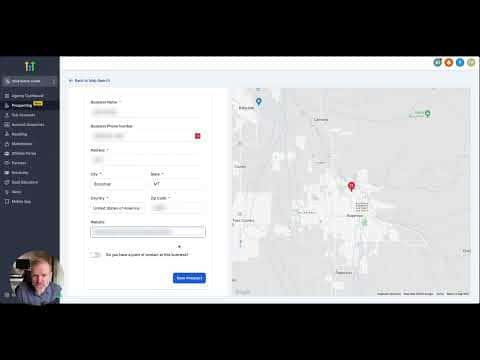
Open the business record to see its website URL. Toggle the contact details section and enter the owner's information if you have it, then click Save Prospect.
Generate and Share the Marketing Audit Report
Let GoHighLevel generate the report. Review sections covering listing accuracy, review counts, and text enablement. Download it as a PDF or copy the share link to send directly to the prospect.
Convert to a Sub-Account When They Sign Up
From the prospect overview page, click the convert button to create a sub-account pre-filled with the business details you already entered.