CRM, Contacts & Lead Gen
Add Tags and Tasks via Zapier in GoHighLevel
By Marnix Geerkens. Published 2020-06-26. Updated 2026-06-02.
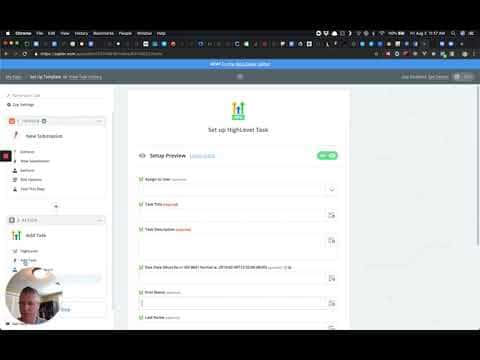
GoHighLevel's Zapier integration now supports two additional actions: Add Task and tagging inside Add/Update Contact. The Add Task action lets you create a task with a title, description, due date, and assigned user directly from a Zap. The tagging option appears inside the existing contact actions so you can label contacts automatically when they are created or updated.
Watch it, then build it
Get the full platform free for 30 days
That walkthrough runs on GoHighLevel. Start it free through RocketLauncher and you get 30 days instead of the usual 14, the whole platform unlocked, plus our setup help and a community of thousands of builders in 47+ countries.
30 days, not 14Full platform, nothing held backFree community and setup help
We earn a referral commission if you keep GoHighLevel after the trial. It never changes your price.
Summary. Two Zapier action updates expand what you can automate when connecting GoHighLevel to other tools. The Add Task action creates a task inside a GoHighLevel location with full control over title, description, due date, and the team member it is assigned to. Separately, the Add/Update Contact and Add Lead to Campaign actions now include a tags field, so you can apply contact tags at the same moment a contact is created or updated through a Zap.

Related tutorials
Watch it, then build it
Get the full platform free for 30 days
30 days, not 14Full platform, nothing held backFree community and setup help
Frequently asked questions
Where do I find the Add Task action in the GoHighLevel Zapier integration?
Select HighLevel (Beta) as the app in Zapier, then search for Add Task in the action list.
Can I assign a task to a specific team member via Zapier?
Yes, the Add Task action includes an optional Assigned To field with a dropdown of users for that location.
Where do I add tags when creating a contact through Zapier?
Scroll down in the Add/Update Contact or Add Lead to Campaign action setup to find the tags field.