RocketLauncher AI

AI & Voice Agents

How To Use Conversation AI Public APIs in GoHighLevel

By Marnix Geerkens. Published 2026-02-04. Updated 2026-06-02.

GoHighLevel's Conversation AI public APIs let developers read and write agent configurations programmatically. You can attach actions to agents, list existing actions, update them, and manage agents entirely through API calls. Authentication requires a private integration token scoped to Conversation AI read and write. Once that token is in place, you can automate agent management without touching the UI.

Watch it, then build it

Get the full platform free for 30 days

That walkthrough runs on GoHighLevel. Start it free through RocketLauncher and you get 30 days instead of the usual 14, the whole platform unlocked, plus our setup help and a community of thousands of builders in 47+ countries.

30 days, not 14Full platform, nothing held backFree community and setup help

We earn a referral commission if you keep GoHighLevel after the trial. It never changes your price.

Summary. GoHighLevel exposes its Conversation AI features through versioned public APIs, giving developers full control over agents and their actions without manual UI work. The API covers attaching appointment booking, workflow triggers, human handover, and other actions to any agent, as well as creating, updating, and deleting agents entirely via code. A private integration token with Conversation AI read and write scopes is the only credential required to get started.

Steps

  1. Open the API 2.0 documentation

    Navigate to the GoHighLevel API 2.0 docs and scroll to the Conversation AI section. You will find action endpoints and agent management endpoints listed there.

  2. Create a private integration token

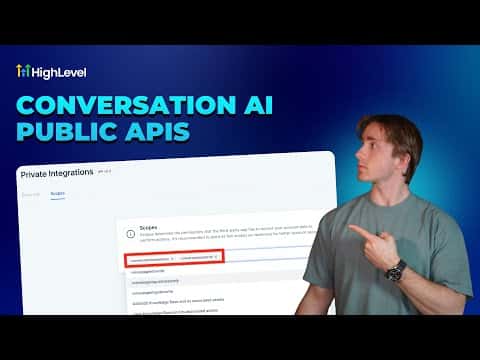
    In your GoHighLevel account, go to Settings then Private Integrations. Create a new token and add only the Conversation AI Read and Conversation AI Write scopes.

  3. Attach or manage actions via API

    Use the attach-action endpoint to add capabilities such as appointment booking or workflow triggers to an existing agent. Pass the agent ID and the action configuration in the request body.

Want the full picture? Read more about GoHighLevel Voice AI and GoHighLevel AI agents.

Related tutorials

How To Use HighLevel's Conversation AI for Efficient Multi Calendar Bookings
How To Use HighLevel's Conversation AI for Efficient Multi Calendar Bookings5:07 · AI & Voice Agents
Did You Know You Can Build Forms, Surveys, and Booking Pages inside AI Studio?
Did You Know You Can Build Forms, Surveys, and Booking Pages inside AI Studio?1:42 · AI & Voice Agents
Did You Know Content AI Can Create Community Posts for You in the Social Planner?
Did You Know Content AI Can Create Community Posts for You in the Social Planner?6:10 · AI & Voice Agents
How To Use HighLevel's Agent Studio Template Library
How To Use HighLevel's Agent Studio Template Library3:52 · AI & Voice Agents
How To Use HighLevel's Ask AI to Streamline Content Creation and Publishing
How To Use HighLevel's Ask AI to Streamline Content Creation and Publishing1:57 · AI & Voice Agents
How to Enable Translation Services for Voice AI Calls
How to Enable Translation Services for Voice AI Calls3:50 · AI & Voice Agents

Watch it, then build it

Get the full platform free for 30 days

30 days, not 14Full platform, nothing held backFree community and setup help

Frequently asked questions

What scopes does the API token need for Conversation AI?

Add Conversation AI Read and Conversation AI Write, nothing else is required.

Which actions can I attach to an agent through the API?

Appointment booking, workflow triggers, human handover, contact field collection, and auto follow-up.

Can I delete an agent through the API?

Yes, the agents endpoint supports create, update, and delete operations.

Back to all AI & Voice Agents tutorials