Getting Started & General
How to Change Voice AI Agent Voices in GoHighLevel
By Marnix Geerkens. Published 2026-04-10. Updated 2026-06-02.
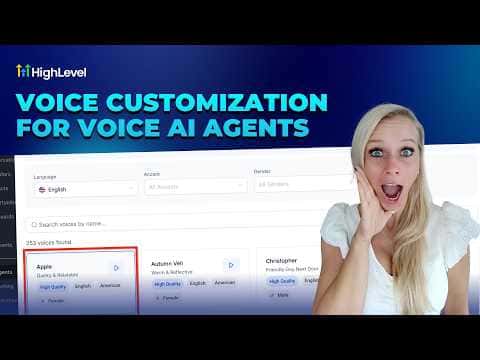
GoHighLevel's Voice AI catalog includes over 340 voices from providers including ElevenLabs, OpenAI, and Cartesia, filterable by language (26+), accent, and gender. You can swap an agent's voice in a few clicks without touching the call script or any workflow logic. Agency owners can also import up to 10 custom voices from ElevenLabs using a voice ID.
Watch it, then build it
Get the full platform free for 30 days
That walkthrough runs on GoHighLevel. Start it free through RocketLauncher and you get 30 days instead of the usual 14, the whole platform unlocked, plus our setup help and a community of thousands of builders in 47+ countries.
30 days, not 14Full platform, nothing held backFree community and setup help
We earn a referral commission if you keep GoHighLevel after the trial. It never changes your price.
Summary. GoHighLevel allows agency owners to change the voice of any Voice AI agent by selecting from a library of 340+ high-quality voices or importing custom voices from ElevenLabs via voice ID. Filtering by provider, language, accent, and gender narrows the choices quickly, and a preview button lets you compare voices before committing. Changing a voice does not affect the agent's call script, intents, or response logic, and the update takes effect immediately after saving.
Steps
Open the agent voice settings
Go to AI Agents in the sidebar, select Voice AI, click Agent List, find the agent, click the three dots, and choose Edit. Locate the Voice section.
Browse the library and pick a voice
Click the current voice name to open the catalog. Filter by provider, language, accent, and gender. Preview voices using the play button and click on the one you want, then click Save Voice.
Import a custom voice from ElevenLabs (agency owners only)
Go to My Voices, click Add Custom Voice, select ElevenLabs, paste the voice ID from your ElevenLabs account, preview it, and click Import Voice. Allow a few seconds for the import to complete, then save.
Related tutorials
Watch it, then build it
Get the full platform free for 30 days
30 days, not 14Full platform, nothing held backFree community and setup help
Frequently asked questions
Does changing an agent's voice affect its call script?
No. Only the audible voice changes. Scripts, intents, and responses stay intact.
How many custom voices can an agency import from ElevenLabs?
Up to 10. The import button is disabled once the cap is reached.
Is there an added cost to access the new voice catalog?
No extra charge. New voices are included for upgraded Voice AI agent users.
Can imported voices be used for both inbound and outbound calls?
Yes, all voices in the catalog and custom imports work for both call directions.