 2:16
2:16सारांश. Proper UTM tagging on Facebook ads is what connects ad spend to contact records inside GoHighLevel's attribution reporting. The parameters go in the tracking section of your Facebook ad, not in the destination URL, using Facebook's dynamic value tokens so each ad set and ad name populates automatically. After connecting your Facebook ad account to the GoHighLevel sub-account and letting traffic run, the attribution report shows which ads are producing contacts and revenue.
आप क्या सीखेंगे
- Find the correct place inside Facebook to enter UTM parameters
- Use Facebook's dynamic tokens to auto-populate campaign, ad set, and ad names
- Add a custom campaign ID parameter for full attribution detail
- Connect your Facebook ad account to a GoHighLevel sub-account
- Read attribution data inside GoHighLevel after traffic has run
स्टेप
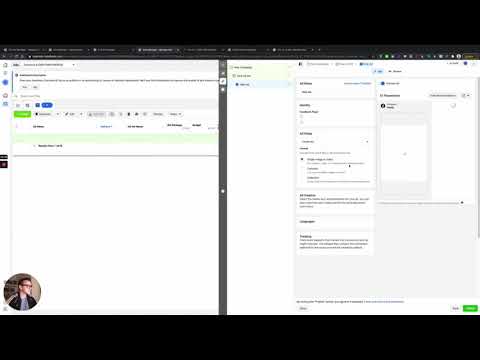
Open your Facebook ad at the ad level
In Meta Ads Manager, navigate to the specific ad (not the campaign or ad set level). UTM parameters are set per ad.
Leave the website URL parameters field blank
There is a URL parameters field in the website section of the ad. Leave this empty. You will use the tracking section below instead, which is where GoHighLevel reads the data from.
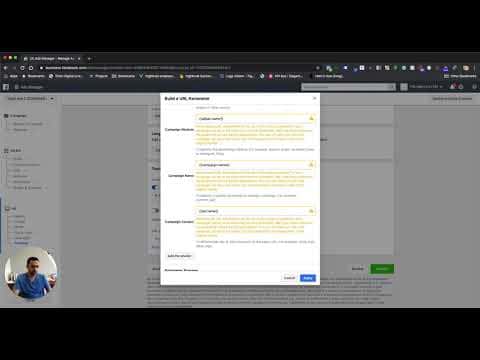
Scroll to the Tracking section and enable URL parameters
Find the Tracking section of the ad. Make sure the Facebook Pixel is selected. Then click the option to build a URL parameter.
Set the UTM source
For utm_source, type 'facebook' (or 'fb'). This tells GoHighLevel the traffic came from Facebook.
Set utm_medium to ad set name
For utm_medium, choose the dynamic token for ad set name. Facebook will fill this in automatically with the actual ad set name when the ad runs.
Set utm_campaign to campaign name
For utm_campaign, choose the campaign name token. This auto-populates with the Facebook campaign name.
Set utm_content to ad name
For utm_content, choose the ad name token. This identifies the specific creative that drove the click.
Add a custom campaign ID parameter
Click to add a custom parameter. Name it something like 'campaign_id' and set its value to the campaign ID dynamic token. This gives GoHighLevel a stable identifier that does not change if you rename a campaign.
Confirm and connect the ad account in GoHighLevel
Click Apply to save the parameters. In GoHighLevel, go to sub-account Settings then Integrations and make sure the Facebook ad account is connected. Let traffic run for 48 to 72 hours before checking the attribution report.
टिप्स
- Dynamic Facebook tokens like {{adset.name}} fill in automatically at delivery time, so you do not have to update UTM parameters when you rename an ad set.
- Wait at least two to three days after launch before judging the attribution report. Data takes time to accumulate.
- Set up UTMs for Google ads using the same approach so all paid sources appear in a single GoHighLevel attribution view.