Social Media

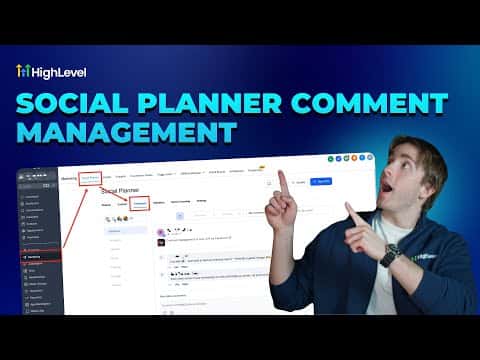
How to Manage Social Media Comments in GoHighLevel Social Planner

GoHighLevel's Social Planner includes a Comments section that pulls in comments from your connected social accounts so you can read and reply without logging into each platform separately. This keeps client engagement visible in one place and lets you respond quickly without context-switching between Facebook, Instagram, and other channels.

2026年6月2日に更新

2:55

概要. The Comments tab inside GoHighLevel's Social Planner aggregates incoming social media comments from connected accounts into a single view. Agencies managing multiple client accounts can monitor and reply to comments across platforms from the GoHighLevel dashboard, reducing the time spent switching between native social media apps. The feature is available at the sub-account level under Marketing, Social Planner, Comments.
よくある質問

Where is the Comments section in GoHighLevel?

Go to Marketing, then Social Planner, and click the Comments tab in the sub-menu.

Which social platforms feed comments into GoHighLevel?

Comments appear from accounts connected in the Social Planner, typically Facebook Pages and Instagram business accounts.

Can I reply to comments directly from GoHighLevel?

Yes, replies sent from the Comments tab post back to the original social platform.

すでに作った人たちと、一緒に作ろう。

無料コミュニティに参加しましょう。毎週のライブ通話、最初に見るコース、あなたの言語のビルダーがいます。

Skoolに無料で参加