 10:51
10:51सारांश. GoHighLevel's LC Email system works out of the box with a shared platform domain, but that shared infrastructure means your reputation is tied to every other sender on it. Adding a dedicated domain to LC Email separates your sending identity completely. This tutorial walks through the full setup: adding a subdomain in GoHighLevel, creating the required DNS records at your registrar, verifying the domain, and confirming that outgoing emails display your domain in the mailed-by and signed-by headers.
आप क्या सीखेंगे
- The difference between the LC Email default domain and a dedicated domain
- How sender reputation works and why a shared domain is risky
- Step-by-step DNS record setup for LC Email dedicated domains
- How to verify your domain is correctly configured in GoHighLevel
- How to confirm the headers on outgoing emails look correct
स्टेप
Navigate to Email Services
In your sub account, go to Settings and click Email Services. If you are using LC Email, you will see a Dedicated Domain option.
Add your subdomain
Click Dedicated Domain, then Add Domain. Type a subdomain you own, such as mail.yourdomain.com or mg.yourdomain.com. Click Add and Verify.
Review the DNS records
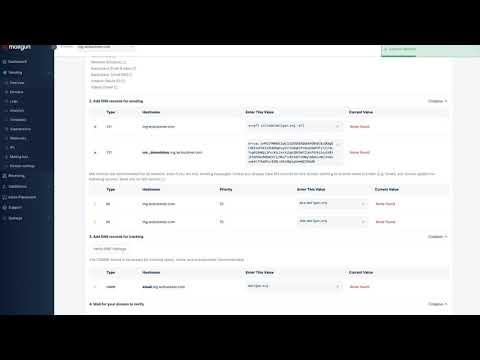
GoHighLevel will display a list of DNS records to create, including TXT records for DKIM and SPF verification, an MX record, and a CNAME. Review all of them before switching to your registrar.
Create the records at your registrar
Log in to your DNS provider and add each record exactly as shown. For TXT records, paste the entire value. For MX records, include the priority value. For the CNAME, use only the subdomain portion as the host name, not the full domain.
Wait and verify
Return to GoHighLevel and click Verify Domain. If it shows as unverified, wait a few minutes and try again. Propagation is usually fast but varies by registrar.
Send a test email
Once verified, send a test email from a conversation in the sub account. Open it in Gmail and click 'Show original' to confirm that mailed-by and signed-by both show your domain, not the platform default.
टिप्स
- Avoid using your root domain (yourdomain.com) as the sending domain. A subdomain like mg.yourdomain.com keeps your email authentication records separate from your website records.
- If verification keeps failing, double-check that you did not accidentally include extra spaces or trim any characters when pasting DNS values.