SMS & Phone

How to Use Custom Values in GoHighLevel SMS and Email

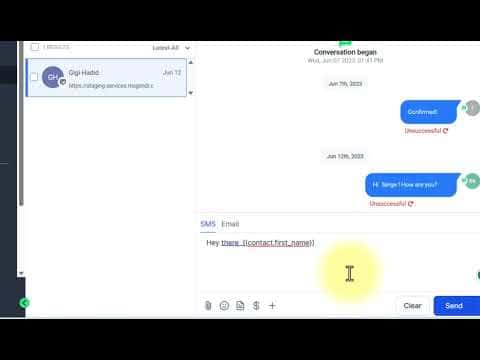
Custom values in GoHighLevel let you insert contact-specific data, like a first name or appointment time, into any SMS or email without typing it manually. The platform replaces the placeholder with the actual record data at send time. You can use them in conversations, workflows, and funnels, though funnels require you to copy the code directly rather than picking from a menu.

Actualizado el 2 de junio de 2026

3:19

Resumen. GoHighLevel custom values are dynamic placeholders that automatically pull contact, appointment, or system data into outgoing messages. They work in the Conversations inbox, workflow SMS and email action steps, and funnel pages. Inserting a custom value is as simple as clicking the picker icon and selecting the field you want, with the system filling in the real value for each contact at delivery time.


Preguntas frecuentes

Where can I insert custom values in GoHighLevel?

In Conversations, workflow SMS and email steps, and funnel page content.

How do I add a custom value inside a funnel?

Copy the custom value code from Conversations or a workflow, then paste it into the funnel element.

What happens if a contact's field is empty when a custom value is used?

GoHighLevel sends the message with a blank space where the value would appear.

Constrúyelo con gente que ya lo hizo.

Únete a la comunidad gratis: llamadas en vivo cada semana, un curso para empezar y gente que construye en tu idioma.

Únete gratis en Skool