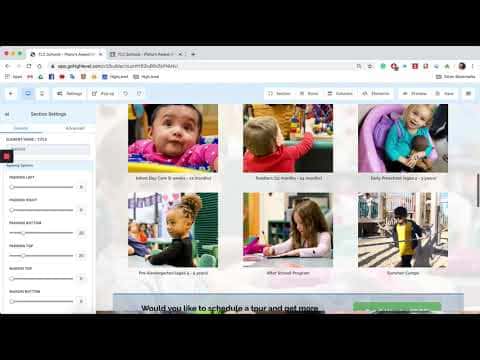
 1:46
1:46Resumo. This tutorial walks through importing an existing ClickFunnels landing page into GoHighLevel's funnel builder using the page URL import feature. After the import, all page elements appear inside the GoHighLevel editor and can be modified, connected to GoHighLevel forms, and published under your own domain.
O que você vai aprender
- Use the URL import field to bring in a ClickFunnels page
- Confirm page ownership during the import step
- Edit imported elements inside the GoHighLevel builder
- Connect GoHighLevel forms and redirect links to the imported page
- Publish the page under a GoHighLevel domain
Passos
Create a new funnel and add a step
In GoHighLevel, go to Funnels and create a new funnel. Click to add a new step. You will see a field for entering a URL.
Paste the ClickFunnels page URL
Copy the full URL of the ClickFunnels page you want to import. Paste it into the import field. Confirm that the page belongs to you, then give the step a name and set its path.
Wait for the import to complete
GoHighLevel fetches the page and reconstructs its elements in the editor. This takes a few seconds. When finished, the page opens in the builder.
Edit and connect the page
Review the imported elements. Update any hyperlinks, swap out the opt-in form for a GoHighLevel form, and set the redirect URL for after form submission. Make any other design adjustments you need.
Save and connect a domain
Hit Save. Create or assign a domain to the funnel so the page is publicly accessible on your own URL.