CRM, Contacts & Lead Gen

Add Tags and Tasks via Zapier in GoHighLevel

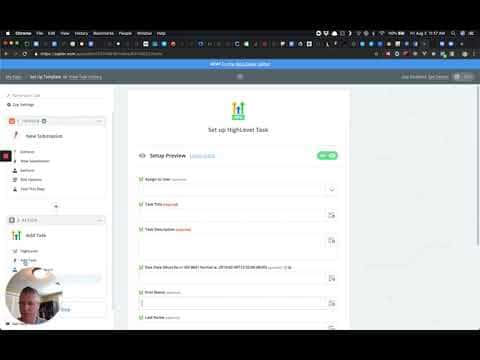
GoHighLevel's Zapier integration now supports two additional actions: Add Task and tagging inside Add/Update Contact. The Add Task action lets you create a task with a title, description, due date, and assigned user directly from a Zap. The tagging option appears inside the existing contact actions so you can label contacts automatically when they are created or updated.

2 giugno 2026 aggiornato

1:28

Sommario. Two Zapier action updates expand what you can automate when connecting GoHighLevel to other tools. The Add Task action creates a task inside a GoHighLevel location with full control over title, description, due date, and the team member it is assigned to. Separately, the Add/Update Contact and Add Lead to Campaign actions now include a tags field, so you can apply contact tags at the same moment a contact is created or updated through a Zap.


Domande che le persone fanno

Where do I find the Add Task action in the GoHighLevel Zapier integration?

Select HighLevel (Beta) as the app in Zapier, then search for Add Task in the action list.

Can I assign a task to a specific team member via Zapier?

Yes, the Add Task action includes an optional Assigned To field with a dropdown of users for that location.

Where do I add tags when creating a contact through Zapier?

Scroll down in the Add/Update Contact or Add Lead to Campaign action setup to find the tags field.

Costruiscilo con persone che lo hanno già fatto.

Unisciti alla community gratuita: chiamate live settimanali, un corso Inizia qui e builder nella tua lingua.

Iscriviti gratuitamente su Skool