CRM, Contacts & Lead Gen

Add Tags and Tasks via Zapier in GoHighLevel

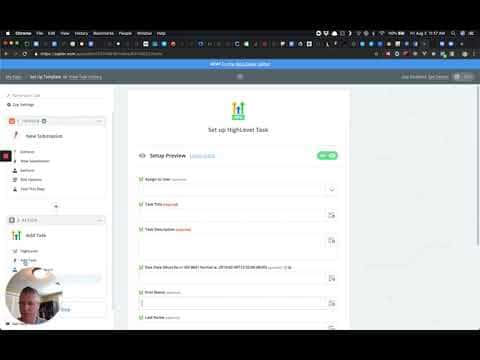
GoHighLevel's Zapier integration now supports two additional actions: Add Task and tagging inside Add/Update Contact. The Add Task action lets you create a task with a title, description, due date, and assigned user directly from a Zap. The tagging option appears inside the existing contact actions so you can label contacts automatically when they are created or updated.

Aktualisiert 2. Juni 2026

1:28

Zusammenfassung. Two Zapier action updates expand what you can automate when connecting GoHighLevel to other tools. The Add Task action creates a task inside a GoHighLevel location with full control over title, description, due date, and the team member it is assigned to. Separately, the Add/Update Contact and Add Lead to Campaign actions now include a tags field, so you can apply contact tags at the same moment a contact is created or updated through a Zap.


Fragen, die Menschen stellen

Where do I find the Add Task action in the GoHighLevel Zapier integration?

Select HighLevel (Beta) as the app in Zapier, then search for Add Task in the action list.

Can I assign a task to a specific team member via Zapier?

Yes, the Add Task action includes an optional Assigned To field with a dropdown of users for that location.

Where do I add tags when creating a contact through Zapier?

Scroll down in the Add/Update Contact or Add Lead to Campaign action setup to find the tags field.

Bauen Sie es mit Leuten auf, die es bereits getan haben.

Treten Sie der kostenlosen Community bei: wöchentliche Live-Anrufe, ein Start-hier-Kurs und Builder in Ihrer Sprache.

Kostenlos anmelden unter Skool