 4:12
4:12Resumen. This walkthrough covers adding a Mailgun sending domain using Cloudflare for DNS management. You create the domain in Mailgun, copy the required DNS records, add each one in Cloudflare (using only the subdomain portion in front of the root, not the full hostname), and then verify. A key detail for Cloudflare users is that the CNAME record must have the proxy toggle off, otherwise Mailgun cannot verify it. After verification, the API key from Mailgun goes directly into GoHighLevel's email settings.
Lo que aprenderás
- Which five DNS records Mailgun requires and what each one does
- How Cloudflare handles subdomain entry differently from some other registrars
- Why the CNAME record must not be proxied through Cloudflare
- Where to find the Mailgun API key and where to paste it in GoHighLevel
- How to confirm the setup succeeded with green checkmarks in Mailgun
Pasos
Add your domain in Mailgun
Log into Mailgun and add a new domain. Mailgun suggests a subdomain like mg.yourdomain.com. You can choose a different prefix (for example, replies), but the mg convention is fine for most setups.
Copy the first TXT record
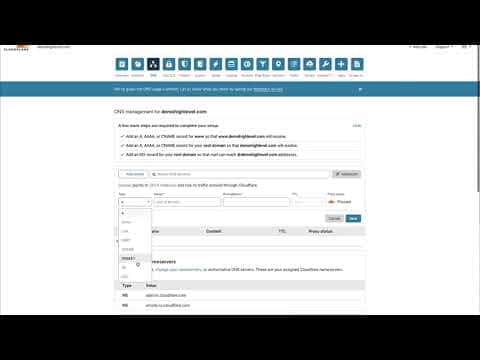
Mailgun shows several records to add. Start with the first TXT record. In Cloudflare, create a new TXT record and type only 'mg' in the Name field (not mg.yourdomain.com). Paste the value and save.
Add the second TXT record
The second TXT record has a longer subdomain prefix. Copy everything in front of the root domain name, paste it as the Name in Cloudflare, paste the value, and save.
Add both MX records
Add the first MX record with Name 'mg', priority 10, and the Mailgun mail server as the value. Repeat for the second MX record, which also uses priority 10 and a different Mailgun mail server address.
Add the CNAME record with proxy off
Create a CNAME record with the full subdomain prefix Mailgun specifies as the Name, and the Mailgun target as the value. Make sure the Cloudflare proxy (orange cloud) is turned off for this record. Mailgun needs a direct DNS lookup to verify it.
Verify DNS in Mailgun
Back in Mailgun, click Verify DNS. Then navigate to Domains, open Domain Settings for your domain, and check the DNS Records tab. All records should show green checkmarks. If any are still pending, wait a few minutes for propagation and verify again.
Copy the API key into GoHighLevel
In Mailgun, go to your account icon, then Security, then API Keys. Reveal the key, copy it, and paste it into the Mailgun field inside GoHighLevel's email service settings.
Consejos
- If you use GoDaddy or Google Domains instead of Cloudflare, you may need to enter the full subdomain (mg.yourdomain.com) rather than just 'mg'. Try both if you hit a verification error.
- Mailgun's help documentation includes registrar-specific guides for GoDaddy and other popular providers if you get stuck on DNS formatting.